
Intervals
Intervals allow you to skip the designated number of days, weeks, or months between sends. For example, if your sending a weekly newsletter but only want the campaign to run every two weeks, you would use intervals to skip sending your newsletter every other week.
How it Works
- Edit an existing campaign or create a new one. Navigate to the Schedule tab
- Select Show Advanced Options at the very bottom of the Schedule tab, under the Next button. You’ll see a box for Intervals appear.
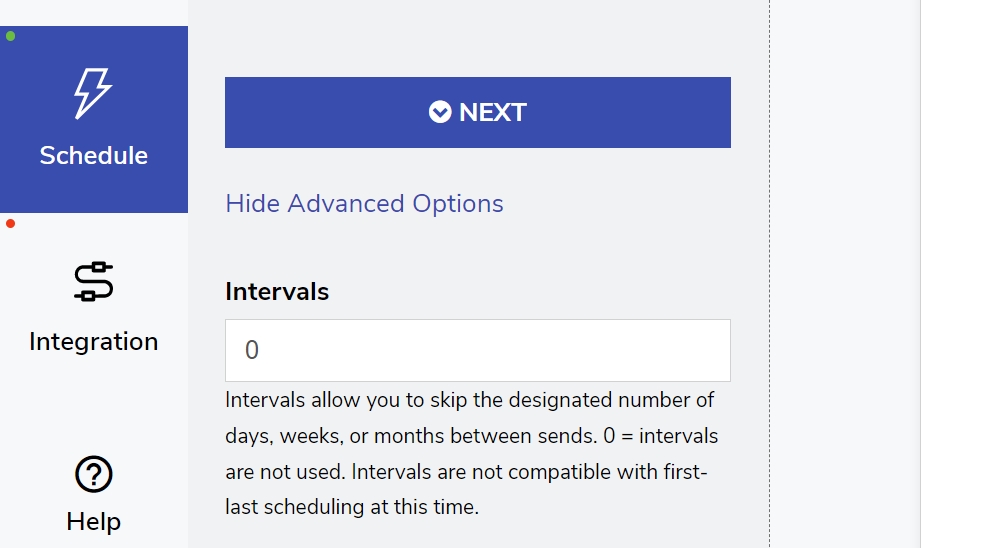
Advanced Options under the Schedule tab allow you to use Intervals.
- Type the number of sending intervals you’d like skipped in your sending frequency in the box provided.
Example Use Cases
Here are a few example use cases that demonstrate how to set the interval frequency.
Example One:
I want to send a biweekly email newsletter, sending to subscribers every other Tuesday.
In this case, we’ll set up the Schedule tab to show Every Week, Tuesday. Then we’ll add the Interval = 1.
This tells FeedOtter to skip one week before sending another newsletter.
Example Two:
Our newsletter is a summary of content sent every 6 months.
Here, we want FeedOtter to skip the monthly sending frequency for 5 months at a time in order to send every 6th month.
We’ll set the sending schedule to Every Month, at your specified day and time. Then, set the Interval = 5.